
Family Nest: Private Locator
Family Nest | GPS Live LocatorParenting
4.51.16K Reviews
- Version
- 3.9.4
- Installs
- 1.00M
- Age Rating
- Everyone
Screenshots
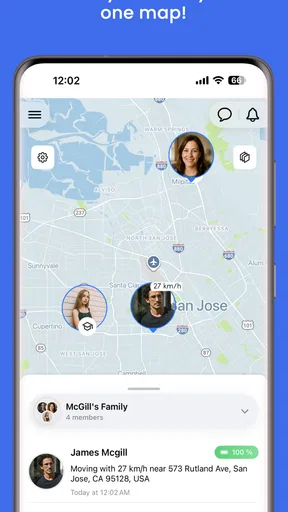
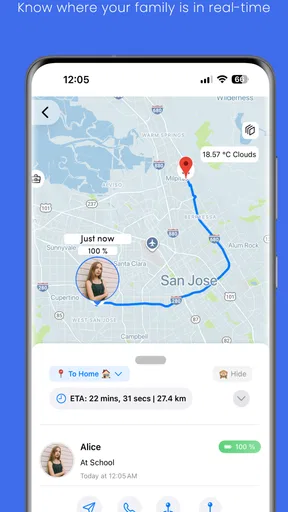
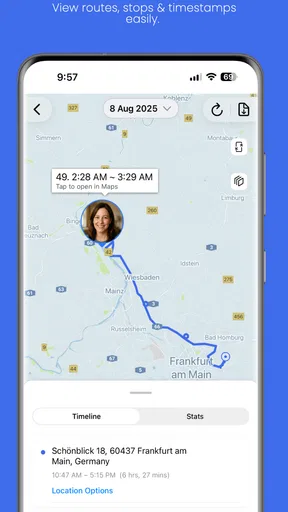
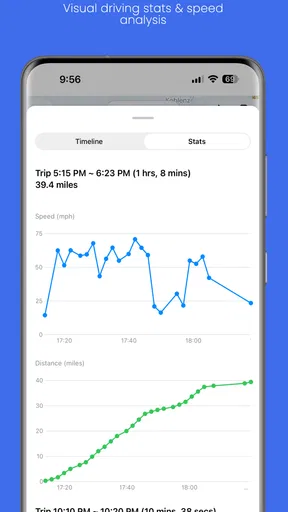
Our Review of Family Nest: Private Locator
 Analysis by Appyee
When a family is juggling school, work, appointments and errands, a quick check-in can be easier than a string of calls. I find Family Nest: Private Locator most useful when everyone agrees that sharing a location is a convenience, not a way to supervise one another. Its focus on family location, check-ins and SOS gives it a practical role, but the real test is whether those habits remain helpful after the first few days.
The first week: reassurance without constant calls
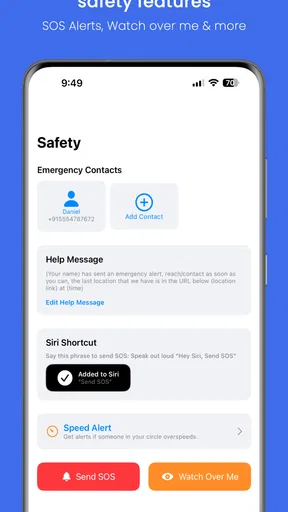
In the first week, the appeal is easy to understand. A parent can check whether a child has reached a familiar destination rather than repeatedly texting, while relatives can use check-ins to let one another know they are safe. An SOS option also gives the app a clear purpose in an urgent moment. These tools are most reassuring when the family has talked beforehand about when to use them and what a location check should mean.
A realistic routine might be a busy weekday when one parent is working late, a child is traveling between school and an activity, and another adult is picking up groceries. Instead of turning every delayed reply into a worry, the family can use a location view or a check-in to coordinate. That does not replace a direct conversation when plans change, but it can reduce unnecessary calls when everyone is simply moving through an ordinary day.
Month-to-month value depends on shared habits
The app is more likely to earn a lasting place when it solves a recurring coordination problem. If family members regularly travel separately, manage pickups, or want a simple way to signal that they have arrived, the value can persist beyond the novelty of seeing a map. If nobody has a reason to check in most weeks, however, the app may become another icon that is opened only when someone is worried.
I would agree on a small number of sensible routines rather than treating location sharing as an all-day conversation. For example, a family might decide to check in after a long journey or use the app when plans shift, while ordinary arrivals need no special attention. That approach makes the tool useful without turning it into a demand for constant availability.
Maintenance, consent and everyday friction
Family location tools only work well when the people in the circle keep them installed, understand how sharing works, and feel comfortable taking part. It is worth setting the expectation that membership is voluntary and that a location check is not proof of what someone is doing. Consent matters especially with teenagers and older relatives: explain why the family wants to use the app, invite questions, and revisit the arrangement if it starts to feel uncomfortable.
There is also a practical maintenance cost. Each person needs a working phone and a willingness to keep the app usable; a dead battery, a device left at home or a forgotten check-in can make the picture less helpful. I would treat the app as one way to coordinate, not as a guarantee that someone is safe or reachable. For an urgent concern, a direct call or local emergency services are more appropriate than assuming a map view will resolve it.
Where it fits among the alternatives
Compared with texting, a family locator can save back-and-forth messages when several people are coordinating at once. A text remains better for explaining a change of plan, asking a nuanced question or sharing information that a location cannot communicate. Compared with a phone’s built-in location sharing, a dedicated family app may feel more centered on family routines, while the built-in option may suit people who want fewer apps to maintain. The better choice depends on what everyone already uses and trusts.
Family Nest is a parenting app from Family Nest | GPS Live Locator. It is free to download, with optional in-app purchases ranging from $0.99 to $34.99 per item. Its 4.4 average from around 28,000 ratings and more than a million installs suggest it has reached a substantial audience, but those figures cannot tell a family whether its approach to sharing will feel right at home. The app is rated for Everyone, and its current version is 3.8.3, with Android support starting at version 5.0.
One useful step before inviting everyone is to agree on who belongs in the circle and what situations justify checking the app. Keeping the group limited to people who genuinely need to coordinate can make sharing feel more personal and less like a household surveillance system. It also gives each person a clear chance to ask how check-ins and SOS should be used, rather than leaving expectations to guesswork.
There are good reasons to skip a dedicated locator. If your family already coordinates comfortably through calls and messages, adding another account and app may create more upkeep than value. It is also a poor fit if one person expects location access without the other person’s willing participation. For families who need occasional reassurance but do not want persistent sharing, ordinary messages or a temporary, agreed-upon check-in may be the more comfortable option.
For me, the lasting question is not whether a location app looks useful on day one; it is whether it helps the family communicate with less stress over time. If the answer is yes, and everyone understands the boundaries, Family Nest can become a practical part of a shared routine. If it leads to arguments about being watched, or no one remembers to use it, the convenience is not worth that cost.
Features That Stand Out
So, what makes Family Nest: Private Locator an appealing choice for families? First off, it offers real-time location sharing. You can see where your family members are at any given time, which is great for peace of mind, especially if you have kids or elderly relatives. But don't worry, it respects privacy by allowing members to control when and how they share their location.
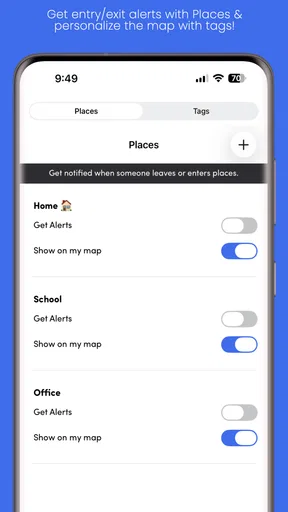
Another cool feature is the ability to set up geofences. You can mark certain areas, like home or school, and get notified when someone enters or leaves these zones. It's like having a digital safety net that keeps you informed without having to constantly check in.
Keeping It Personal and Private
Privacy is a big deal these days, and I get it—nobody wants to feel like they’re being watched. The app addresses this by offering a private chat feature. You can send messages and updates without worrying about anyone outside your circle peeking in. Plus, all data is encrypted, so your information stays secure.
Additionally, the app doesn’t bombard you with ads or unnecessary notifications, which is a huge relief. It's refreshing to use an app that respects your attention span and focuses on functionality rather than flashy distractions.
Easy Peasy Setup
Getting started with the app is a breeze. You simply download it from the App Store or Google Play, set up an account, and invite your family members. The interface is intuitive, even for those who aren't tech-savvy. Trust me, if my parents can navigate it, anyone can!
The user-friendly design means you don’t have to spend hours figuring out how to use it. Everything is clearly labeled, and there are helpful tips along the way to guide you through the setup process.
Real-Life Scenarios Where It Shines
Let’s talk about some real-life situations where this app really shines. Have you ever been worried about your teen getting home from a late-night study session? With the app, you can check their location and ensure they’re safe without having to call every five minutes. It’s a win-win for both parents and teens.
Or maybe you have an elderly family member who lives alone. Knowing they’ve safely arrived home after an errand can be incredibly reassuring. The app’s notifications are subtle yet effective, and they’ve definitely made my life a bit less stressful.
Wrapping It Up
So, is Family Nest: Private Locator worth downloading? In my opinion, absolutely. It’s a practical tool for staying connected with your family without crossing into helicopter parenting territory. The peace of mind it offers is invaluable, and the features are thoughtfully designed with family life in mind.
If you’re looking for a way to keep tabs on your loved ones without being overbearing, this app strikes the perfect balance. Give it a go, and you might find it becomes an indispensable part of your daily routine. Whether you’re a tech enthusiast or just someone who wants to make family life a bit smoother, this app is definitely worth a look.
Privacy and Permissions
See what permissions an app requests and how it handles your data.
- Device & app history
- retrieve running apps
- Identity
- find accounts on the device
- Contacts
- find accounts on the device, read your contacts
- Location
- approximate location (network-based), precise location (GPS and network-based)
- Photos/Media/Files
- read the contents of your USB storage, modify or delete the contents of your USB storage
- Storage
- read the contents of your USB storage, modify or delete the contents of your USB storage
- Wi-Fi connection information
- view Wi-Fi connections
- Other
- view network connections, full network access, run at startup, draw over other apps, control vibration, prevent device from sleeping, Google Play license check, read Google service configuration
Verdict
Strengths of Family Nest: Private Locator
- Real-time location tracking for family safety.
- Easy setup with user-friendly interface.
- Geofencing alerts for entering/exiting zones.
- Battery-efficient background location updates.
- Supports emergency SOS alerts for quick help.
Limitations of Family Nest: Private Locator
- Requires constant internet connection for accuracy.
- Location data might raise privacy concerns.
- Limited free features; premium needed for more.
- Occasional app crashes reported by users.
- Notifications can sometimes be delayed.
Similar Picks in This Category
View All
Family Space
Motorola Mobility LLC.3.9

شرطة الأطفال - مكالمة وهمية
Oub Apps4.1

Findmykids: Parental Control
LETEM LTD4.6

Pregnancy + | Tracker App
Philips Electronics UK Limited4.8

Policía de niños - para padres
Kids police4.7

Pregnancy App
Amila4.9
Frequently Asked Questions
Is Family Nest: Private Locator free to use?
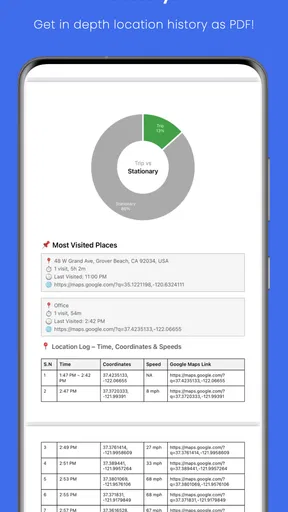
Family Nest: Private Locator offers a free version with basic features, allowing you to track family members and share locations within a limited range. For advanced features such as real-time tracking, location history, and geofencing alerts, you may need to opt for a premium subscription. Pricing details can be found within the app.
How does Family Nest ensure privacy and data security?
Family Nest: Private Locator prioritizes user privacy by employing end-to-end encryption for all location data. Users have control over who can see their location and can easily adjust privacy settings. The app does not share data with third parties, ensuring that your information remains confidential.
What devices are compatible with Family Nest: Private Locator?
Family Nest: Private Locator is available for both Android and iOS devices. It supports most smartphones and tablets running Android 5.0 or later and iOS 11.0 or later. Ensure your device meets these requirements for optimal performance and access to all features.
Can Family Nest: Private Locator be used internationally?
Yes, Family Nest: Private Locator can be used globally, making it a great tool for families with members traveling abroad. However, be aware of potential data charges when using the app outside your home country, and check with your mobile provider for details on international data usage.
How accurate is the location tracking in Family Nest?
The accuracy of location tracking in Family Nest: Private Locator largely depends on your device's GPS capabilities and network connectivity. In areas with strong GPS signals and good internet access, the app provides accurate real-time tracking. In remote or obstructed areas, accuracy may vary slightly.
